Built-In Crypto Exchange

Built-In Crypto Exchange

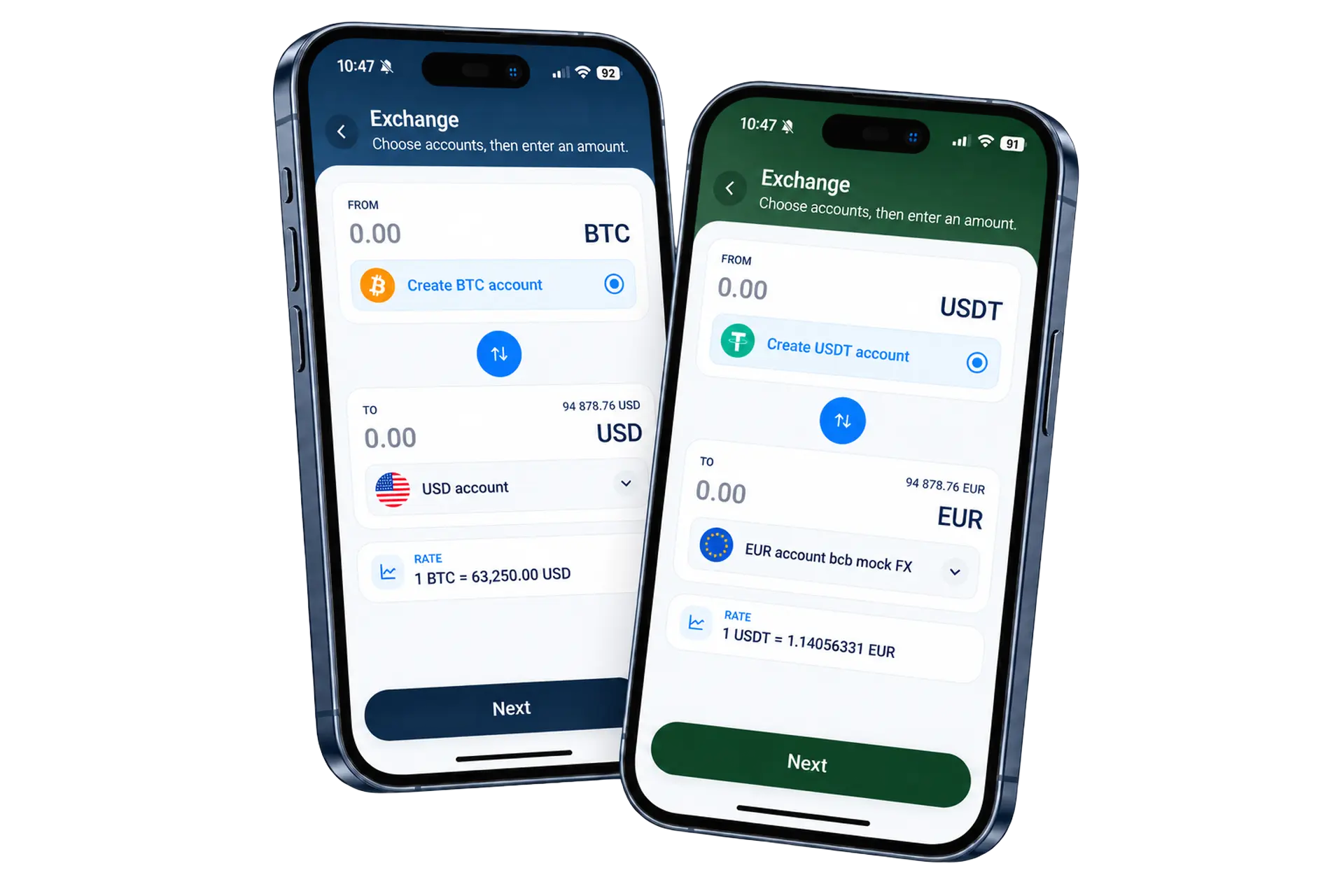
Buy or sell either currency in a pair, fiat to crypto, crypto to fiat, or crypto to crypto, at a live market price. Whichever field is typed into is fixed exactly; the other side is always an estimate.

FinHost mobile exchange screens showing AED to EUR FX and USDT to EUR crypto exchange

Every order, accounted for

Four outcomes, never a silent one

An order isn’t the same thing as a completed trade. Whichever way it goes, the customer sees exactly where it stands.

Executed

Order fully filled

Completed on the exchange’s side in one or more trades, and the balance reflects the full amount.

Exec. (Partl.)

Completed on less than requested

The difference is returned to the account balance rather than left pending indefinitely.

Open

Still working on the exchange side

A known number of trades have filled already, and more may follow before it finally closes.

Failed

Order didn’t complete

Available and pending balances are rolled back in full, with a specific reason shown.

Outside of a full execution, the customer always sees a plain explanation of where the order stands and, where it matters, what happens to their balance.

Common error states

Specific messages for specific problems

Insufficient balance

Not enough to sell

Can happen if orders fire from different tabs at once. The one that no longer fits is rejected cleanly.

Pair not supported

Currency pair unavailable

The selected pair currently isn’t supported for trading.

Account status

An account isn’t active

The from or to account’s status is invalid at the moment the order is placed.

Account not found

No matching account

Shown if the currency the order needs doesn’t have a matching account behind it.

Fee exceeds amount

Too small to be worth trading

If the estimated buy amount wouldn’t cover the fee, the order is stopped before it’s created.

System

Something went wrong

A generic message covers rarer backend or provider errors, with a direct line to support.

How it actually works

Priced live from Kraken’s own order book

Pairs are pulled from the connected exchange and filtered down to the currencies your customer’s accounts can actually support, so the picker never shows a pair that has nowhere to settle.

Configuration example

Pair list refreshEvery 60 seconds
Order types exposedMarket only
Confirmed providerKraken
Pair filteringWhitelist-based

Two moments, two roles

An estimate while typing, a fixed number at confirmation

While typing

A live, recalculating estimate

The opposite field updates continuously as the market price moves, so nothing is fixed yet.

→
At confirmation

One number, fixed and reserved

The typed side is locked exactly and the balance is reserved before the order reaches the exchange.
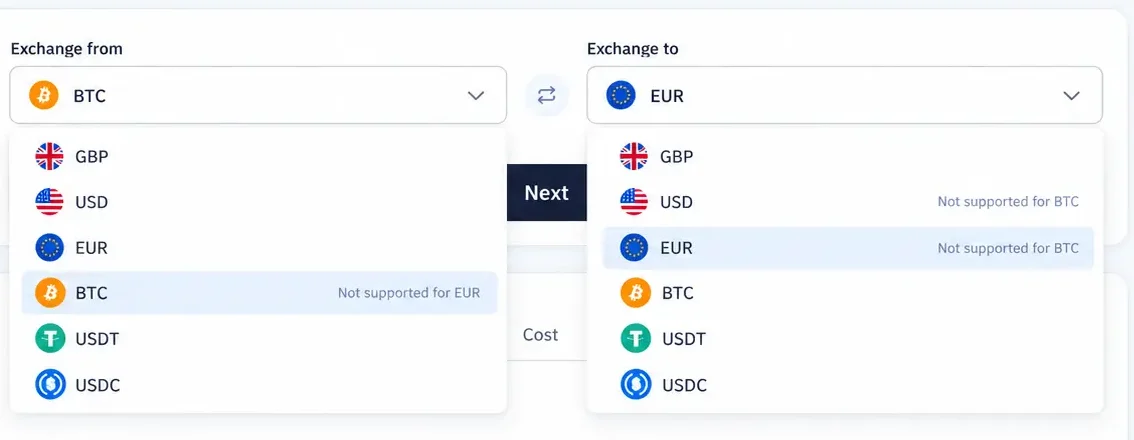
FinHost web exchange account and currency selectors with fiat and crypto options

Choosing an account

Not just a currency, the exact account

If more than one account shares a currency, every one of them appears with its own balance, so the right one gets picked rather than assumed.

  • Only real exchange accounts appearEach one carrying the crypto-exchange product.
  • The rate stays visible at zero balanceA missing account never blocks seeing the price.
  • A missing account prompts Create newOne tap, without leaving the flow.

Order history

Fiat and crypto exchange activity in one clear view

Customers can review each currency pair, the amount sold, the amount bought, and the current status without switching between separate FX and crypto products.
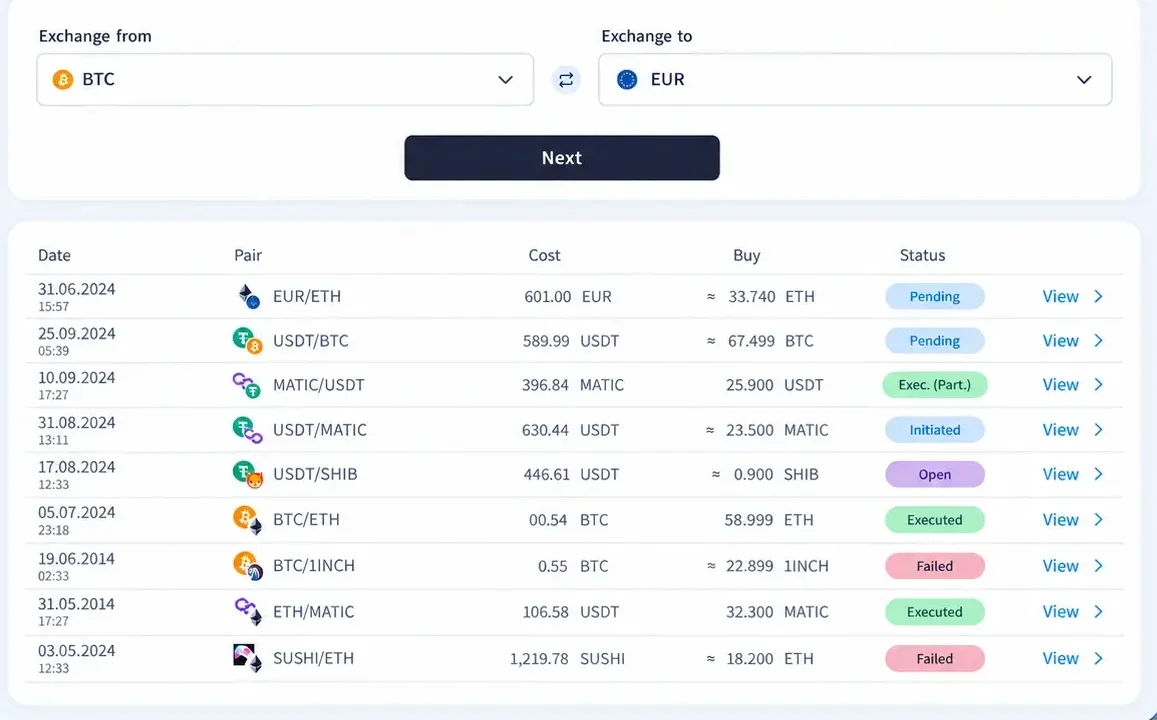
  • Every pair is identifiableFrom EUR/ETH and USDT/BTC to other enabled combinations.
  • Cost and buy amount stay togetherThe two sides of every conversion remain easy to audit.
  • Status is visible at a glancePending, initiated, open, executed, partially executed, or failed.
FinHost exchange order history showing currency pairs, amounts, and order statuses

Get started

See the built-in exchange in action

Live pricing, fixed-side protection, account-level control, and full order tracking, on web and on mobile.

ResultExecuted
PairBTC/ETH
Fee0.02 ETH

Frequently Asked Questions

What happens if I type the amount I want to receive instead of what I’m spending?
Typing into the From field fixes exactly that amount to be sold. Typing into the To field calculates the amount to sell at the live price, and that calculated amount is what’s actually fixed and spent, not the number typed.
What order types are supported?
Market orders only, which execute near-instantly at the live price. Limit orders exist in the underlying exchange but aren’t exposed to customers yet.
What happens if an order is only partially filled?
The filled portion is credited as it happens. If the exchange can’t fill the remainder, the order is closed automatically and the unfilled amount is returned to the balance it came from.
Can a customer choose which account to trade from?
Yes. If more than one account shares that currency and carries the crypto-exchange product, all of them appear so the right one can be picked.
What if the destination account doesn’t exist yet?
A Create new prompt appears in its place. The rate and estimated amount are still visible, but the order can’t be placed until the account exists.
Why does the confirmation screen warn about volatility?
Because the market price can move between confirmation and execution: cryptocurrency prices are volatile, and the value of the order can increase or decrease rapidly in that window.
How is an order confirmed as complete?
Status moves from Initiated through Open to Executed or Executed Partially as fills complete, with each underlying fill visible as its own transaction.

Contact Us