Crypto Deposits & Withdrawals

Crypto Deposits & Withdrawals

A dedicated address for every currency and network. A withdrawal address that’s checked before anything is sent, and a fee that’s never a surprise.

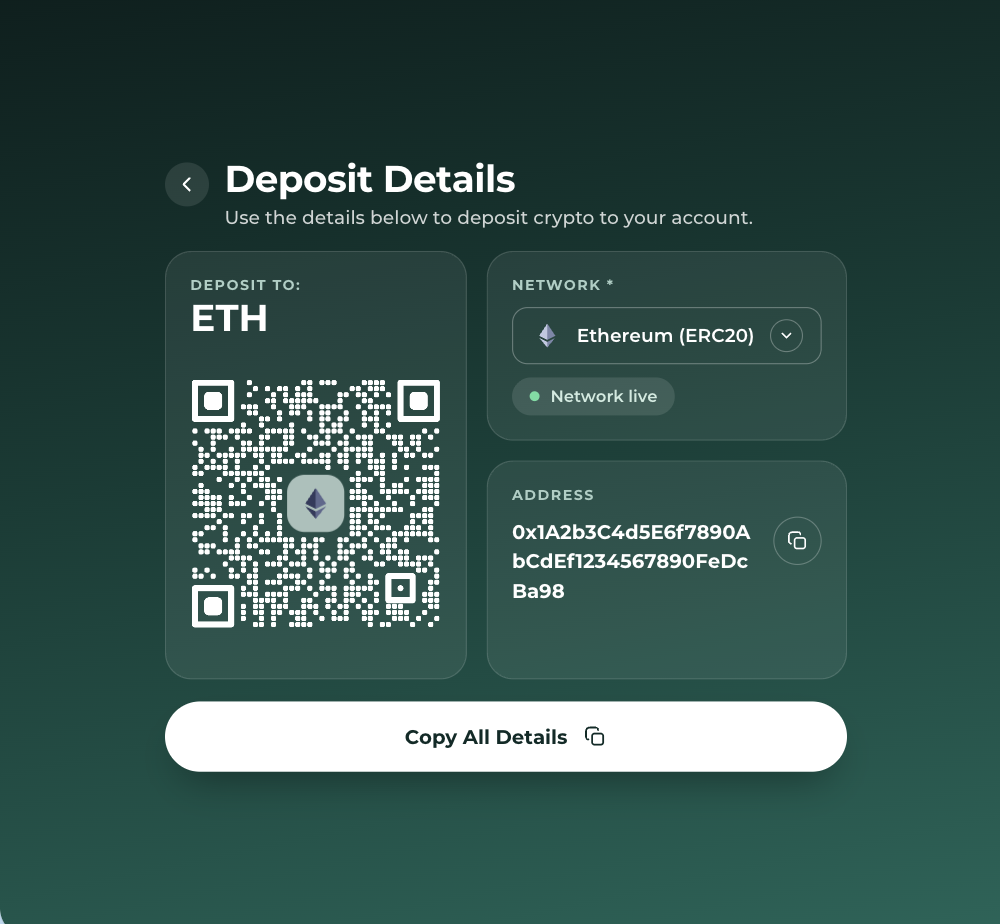
FinHost crypto deposit details screen for an Ethereum deposit on the ERC20 network

Every transaction, accounted for

Four outcomes, never a silent one

Whichever way a deposit or withdrawal goes, the customer sees exactly what happened and, where it matters, what to do next.

Sent

Deposit or withdrawal completed

An on-chain transaction ID confirms it settled, linking straight to that network’s block explorer.

Fee changed

Network fee moved before confirming

The transfer is stopped rather than sent at an outdated fee. It can simply be started again.

Unavailable

No network available for this currency

A plain explanation appears in place of an empty dropdown or a form that quietly fails.

Failed

Transfer didn’t complete

A specific failure reason sits next to the record itself, not a generic error message.

Outside of a completed transfer, the customer always sees a plain explanation of what happened. Nothing is left to guesswork, and nothing fails silently.

Common error states

Specific messages for specific problems

Insufficient funds

Balance too low

Flagged inline on the amount field before the withdrawal can be submitted.

Min. amount

Below the network minimum

Deposits or withdrawals under the stated minimum are rejected with the exact figure shown.

Own address

Withdrawal to own address

Blocked automatically, ruling out an entire class of accidental self-transfers.

Fee changed

Fee exceeded expectations

Stopped and the customer is asked to retry, rather than sent at a materially different fee.

Account status

Account not active

The currency account’s status is invalid, and the transfer can’t proceed until it’s resolved.

System

Something went wrong

A generic message covers rarer backend or provider errors, with a direct line to support.

How it actually works

Deposits route through a dedicated custody layer

Funds move from the provider’s per-customer vault into the exchange or an omnibus account, so every deposit can still be matched to the right customer even though the exchange itself can’t track individual wallets.

Network configuration example

Deposit minimum (BTC)0.0005 BTC
Withdraw minimum (BTC)0.0002 BTC
Confirmed custody providerFireblocks
Networks supported11

Set up once

The address is generated once, not on every deposit

At setup

An address is generated

The first time a customer deposits a currency on a given network, a dedicated address is created for it.

→
Every deposit after

The same address is reused

Later deposits on that network reuse the same address. Nothing new needs to be generated.

Crypto withdraw
Bitcoin Account
NetworkBitcoin
Amount1.00 BTC
Amount with fee1.0090 BTC
Wallet address0xf3f0…f4lde
Recipient nameName

Starting a withdrawal

Every field, and the fee, before submitting

The withdrawal form shows the amount with fee as it’s typed, and asks for the same recipient details every time, so support can always match a payment to a real person.

  • Amount with fee updates liveVisible before anything is sent.
  • Recipient details collected up frontName and type, for the record.
  • Address validated against the networkFormat, length and prefix, as it’s typed.

When the fee moves

A specific warning, not a generic one

If the network fee shifts materially between review and submission, the customer is stopped and told exactly why, instead of the transfer going out at a different price.

  • Plain languageNaming the fee change, not a generic failure.
  • Nothing sent at the old priceThe transfer stops before it’s submitted.
  • One clear next stepStart the payment process again.

Fees changed significantly

Please try to start the payment process again.

Cancel
Try again
Deposit details
Deposit address0xec7842…1cec4
VASP nameOwn institution
Wallet owner nameJohn Smith
Copy All Deposit Details

Getting a deposit address

A QR code and compliance details, not just an address

Once a network is selected, the address is generated together with the details some receiving institutions ask for under Travel Rule requirements: who owns the wallet, and which VASP it belongs to.

  • A QR code alongside the addressScannable directly from a wallet app.
  • Wallet owner name, ready to shareFor when a sending bank asks who the wallet belongs to.
  • One button copies everythingAddress, VASP name and owner name, all at once.

Related FinHost modules

Works alongside the accounts customers already have

Get started

See crypto deposits and withdrawals in action

Per-network addresses, live validation, fee transparency and on-chain tracking, on web and on mobile.

ResultSent
NetworkBitcoin
Fee0.0090 BTC

Frequently Asked Questions

What happens if a deposit is below the minimum?
It can’t be credited to the account. The deposit amount is shown before sending, and any amount below it is lost permanently, even if a later deposit meets the minimum requirement.
Which networks are available for USDT?
USDT can be deposited and withdrawn via Ethereum (ERC20) or Tron (TRC20). Each network gets its own dedicated address, so the same USDT account can hold two separate deposit addresses at once.
Can a customer withdraw to any wallet address?
To any external wallet address that’s valid for the selected network, with one exception: the account’s own deposit address is blocked, to prevent accidental self-transfers.
What if the network fee changes while a withdrawal is being confirmed?
If the fee moves significantly between the review screen and submission, the withdrawal is stopped with a clear message asking the customer to start the payment process again, rather than sending at an outdated fee.
How is a deposit or withdrawal confirmed as complete?
Each transaction carries an on-chain transaction ID once it settles on the blockchain, which links out to that network’s block explorer for independent verification.
What happens if there’s no available network for a currency?
The interface shows a clear unavailable message rather than an empty or broken form, and points the customer to support for more detail.

Contact Us