Payments & Money Movement

Transfer Orders

A compliant way to send money abroad, for Non-Custodial Payment Providers. Your customer specifies where the money should go, and it is forwarded directly, without ever sitting in a balance.

Specifically designed for Non-Custodial Payment Providers
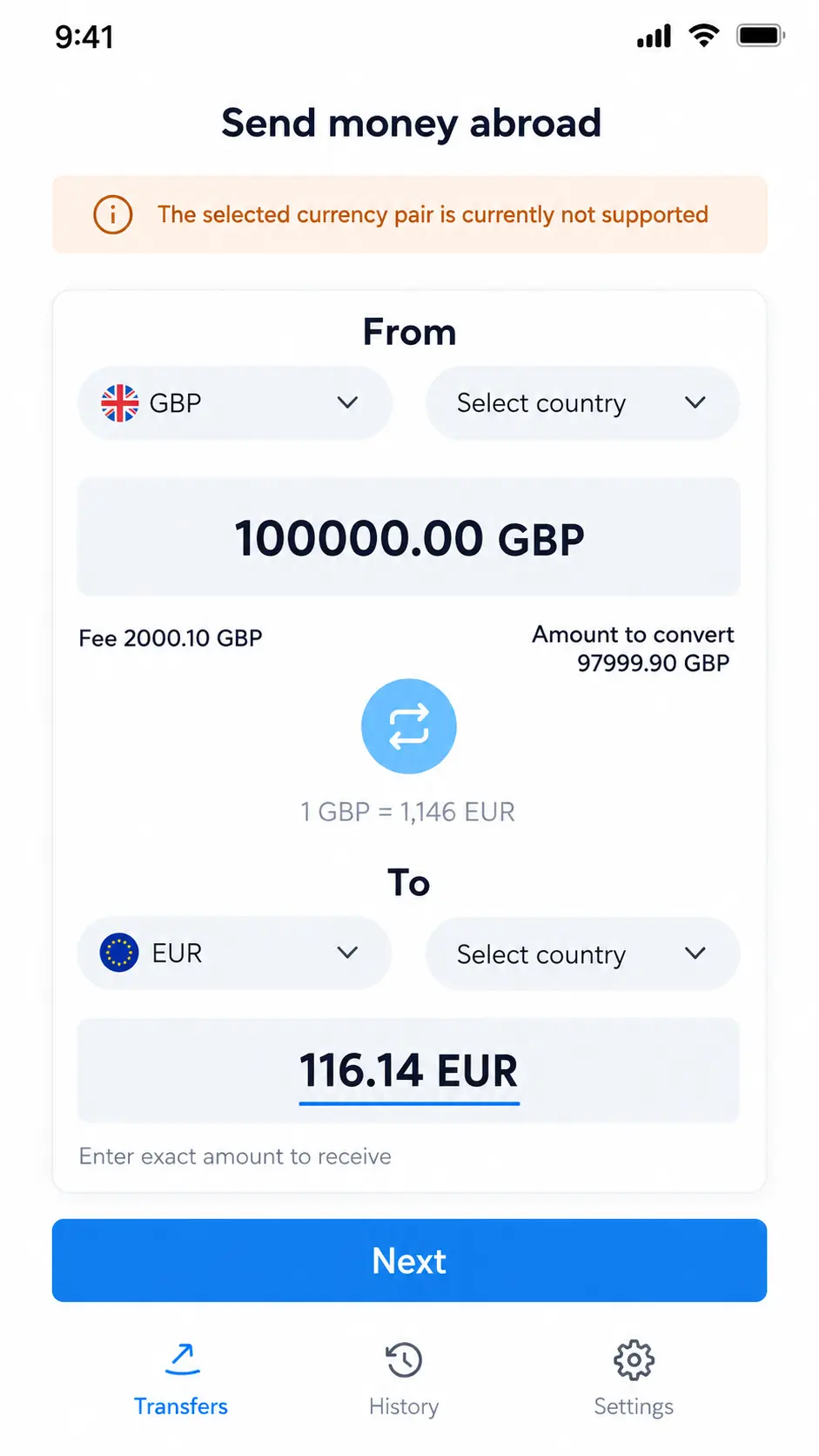
FinHost Transfer Orders screen for entering transfer amount and corridor
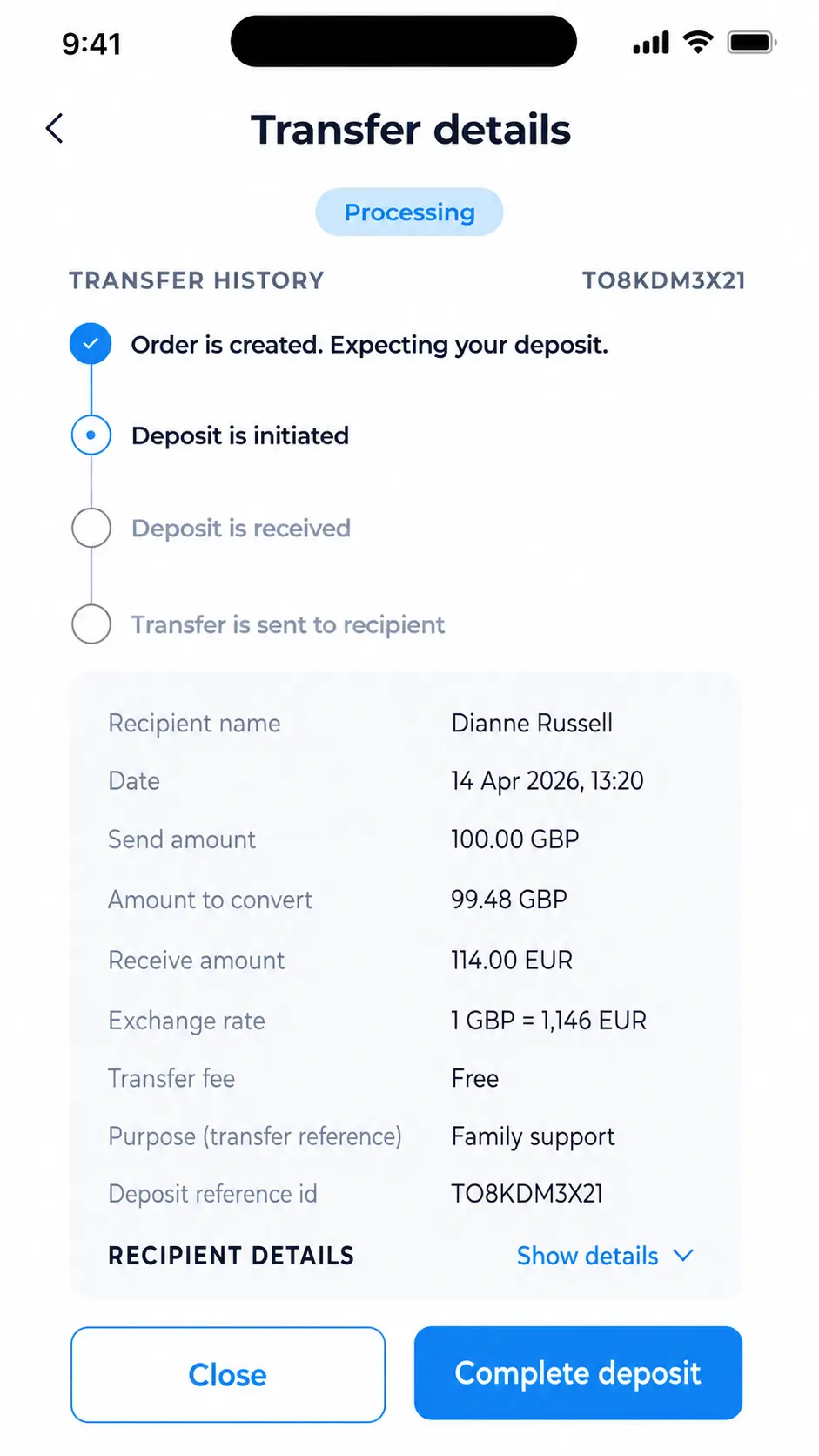
FinHost Transfer Orders screen showing transfer status and transfer details
Send money abroad No customer balance required
Track every order Status stays visible to the customer
2 min rate lock

Built for a specific license reality

When your license will not let you hold client funds

Non-Custodial Payment Providers do not allow a platform to hold customer balances. Transfer Orders is how those platforms still offer a send-money experience.

Non-Custodial Payment Providers

Cannot hold client funds

  • No client account or e-wallet balance
  • Funds cannot rest in the system, even briefly
  • Payment instructions only, not a stored balance
Custodial & Stored-Value Providers

Still a full send-money experience

  • Customer specifies currency, amount, and recipient
  • Funds pass straight through to the recipient
  • Full order tracking, without a balance account
CapabilityNon-Custodial Payment ProvidersCustodial & Stored-Value Providers
First-party paymentAllowedAllowed
Client account or e-wallet balanceRestrictedAllowed
Provide IBANs and account numbersAllowed, as transfer instructions onlyAllowed

What is included

Everything a compliant transfer needs

Automatic corridor routing

The right payment method, local rail or SWIFT, is chosen automatically from the currency and country your customer picks.

A rate locked long enough to decide

Once your customer reaches the final confirmation, the rate is held for a short window, so it cannot shift under them mid-decision.

Clear deposit instructions

A dedicated reference number ties every incoming deposit to the right transfer order, every time.

Full order tracking

Customers can check the status of any transfer at any time, from deposit received through to funds sent.

Recipients you can reuse

Every recipient added is saved for next time, the same as anywhere else in the platform.

Fiat and crypto corridors

Send in a fiat currency or in supported crypto networks, using the same underlying flow.

How it works for your customer

Six steps, from choosing a corridor to funds arriving

No balance is created at any point in this flow.

STEP 01

Choose currency and country

Send currency, receive currency, and both countries.

STEP 02

Enter an amount

Either side, send or receive. The other is calculated.

STEP 03

Add a recipient

The standard recipient form, scoped to the right method.

STEP 04

Confirm the transfer

Review amounts, rate, and recipient, one last time.

STEP 05

Send the deposit

Using the bank details and reference number shown.

STEP 06

Track and receive

Funds are confirmed, exchanged, and sent to the recipient.

100.00GBP
6,880.50EGP
Fee1.00 GBP
Exchange rate1 GBP = 69.5 EGP
The fee is always shown. Any rate margin never is.

Choosing an amount

Enter either side, get the other automatically

Your customer can fix the amount they send, or the amount the recipient should receive, whichever matters to them.

  • The amount they typed never changes when the rate updates
  • Only the other, calculated side adjusts
  • If the fee would exceed the amount sent, the customer is stopped clearly, before submitting
Caught before it happens

If the fee is larger than the amount entered, the amount is shown in red and the customer sees: Amount must be greater than the fee

Tracking a transfer

Your customer can always check where things stand

A transfer order has its own details view, available any time, with a clear current status.

  • Amounts, applied rate, and recipient details, all in one place
  • A specific, plain-language explanation for every status
  • Deposit instructions available again if a deposit still needs to be sent
TO-4471Processing
Order is created. Expecting your deposit.
Deposit is initiated (by you).
Deposit is received.
Transfer is sent to recipient

Adding a recipient

The same recipient form as everywhere else

Nothing new to learn. The standard recipient form appears, already scoped to the right payment method for the corridor chosen.

  • Bank country is pre-filled and locked, avoiding a common entry mistake
  • For Egypt specifically, the customer can add a recipient by IBAN or by phone number
  • Every recipient added is saved for next time, exactly like recipients added anywhere else

Saved once. Reusable on every future transfer.

Fatima AliPersonal
Phone number+20 100 123 4567
RelationshipFather
Saved automatically for your next transfer to Fatima.

Where money can go

Local rails where they exist, SWIFT everywhere else

The right method is chosen automatically. Your customer never has to know the difference.

🇪🇺EURSEPA, SWIFT fallback
🇬🇧GBPFaster Payments, SWIFT fallback
🇪🇬EGPEG-ACH or MNO wallet, SWIFT fallback
🇨🇦CADEFT, SWIFT fallback
🇦🇪AEDUAE local, SWIFT fallback
🌐CryptoUSDT, USDC, BTC, TRX, ETH
🇺🇸USDACH, Fedwire, SWIFT fallback
🌍Any other currencySWIFT

Why FinHost

Compliant by design, not as an afterthought

Built for the license, not around it

Designed from the ground up for licenses that don’t allow holding client funds, not adapted from a balance-based product.

Every step confirmed, nothing silent

Your operations team confirms each stage of a transfer explicitly, with a stated reason required for any rejection.

The fee is honest, always

What the customer is charged is always shown clearly, on the confirmation screen and on the order itself, every time.

Behind the scenes

Your operations team stays in full control

Today, every transfer order is progressed by an admin, one confirmed step at a time.

One Back Office workspace

Find, review, and progress every transfer order

Operations teams can work from one place without jumping between separate tools or disconnected records.
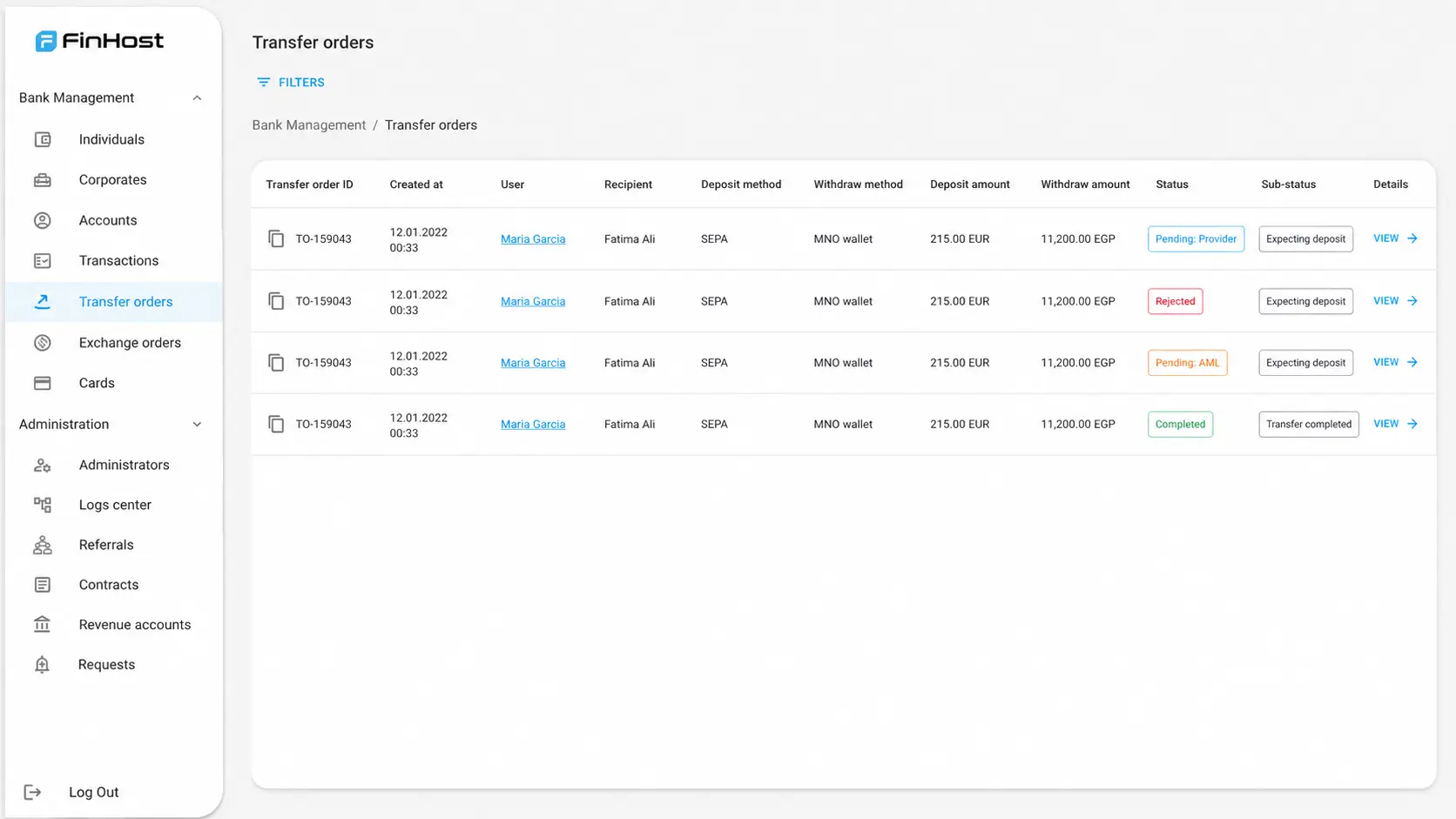
Find the right order fastFilter by user, order ID, deposit reference, date, status, or sub status.
Confirm each stage explicitlyFrom deposit received through to the outbound payment, each step stays under operational control.
Keep order context togetherStatus, recipient, corridor, rate, fee, and compliance information remain attached to the same order.
FinHost Back Office Transfer orders list view with filters, statuses, and transfer order records
Operational controlEvery stage confirmed by admin
Filter & review One workspace for every order

Offer compliant money transfer, no balance required

Built for the license restrictions that a standard account-based product cannot serve.

FinHost Send money abroad screen for entering amounts and currencies
FinHost Transfer details screen showing a transfer status timeline and transfer details

Frequently Asked Questions

Do I need a license that allows holding client funds to use Transfer Orders?
No. Transfer Orders exists specifically for Non-Custodial Payment Providers. If you are a Custodial & Stored-Value Provider, your customers can also use standard account-based transfers.
Does the customer ever have a balance?
No. Funds pass through the platform’s own account and are forwarded to the recipient. They are never held in a personal balance for the customer.
Can the customer see the status of their transfer?
Yes. Every transfer order has its own details view the customer can check at any time, showing the current status, the amounts, the applied rate, and the recipient details.
Does the customer see the exchange rate markup?
No. The fee is always shown clearly. Any margin built into the exchange rate itself is never shown to the customer, on the screen or in the underlying data returned to the app.
What happens if a rejected transfer already received a deposit?
The customer is told their deposit will be returned, and once it is, they see a clear confirmation that it has been sent back to them.
Can the customer add a recipient by phone number instead of a bank account?
For corridors that support it, such as Egypt, yes. The customer can choose to add a recipient by IBAN or by phone number, and both options appear together when reusing a saved recipient.

Contact Us