
Digital Transfer Receipts
Give customers instant proof of every outgoing transfer. They can review the transaction in the app, generate a branded PDF receipt, and download a complete record with the payment, sender, beneficiary, fee, and relevant bank details.
From transaction details to a downloadable PDF
One module for confirming, documenting, exporting, and revisiting every outgoing fiat transfer.
Generate a PDF receipt
A customer selects Get a Receipt and FinHost creates a downloadable document for the completed transfer.
Full transaction confirmation
Date and time, status, amount, transaction ID, reference, and payment method.
Sender and recipient details
From account name to full recipient bank information, shown when it applies.
Corridor-aware fields
SEPA, UK Faster Payments, SWIFT, and Internal transfers each show exactly the fields that apply.
Complete multi-page SWIFT receipts
When a SWIFT transfer uses an intermediary bank, the PDF can continue onto a second page with the additional banking details.
Branded, customer-ready output
The generated PDF presents the tenant’s transaction information in a clear format that is easy to save and share.
Generate a PDF receipt in a few clear steps
Complete a transfer
Any outgoing fiat transfer, on any corridor.
Open the transaction
Find it in the transaction list.
View transaction details
Date, status, amount, reference, and payment method.
Expand recipient details
Full bank information for the corridor used.
Generate the PDF
Select Get a Receipt to create and download the full document.
The same core details, on every transfer
Whatever the corridor, every receipt opens with the same confirmation fields, so a customer always knows what to look for.
- Date and time of the transfer
- Status: Sent, Pending, or Failed, with a reason shown for failures
- Amount, with the fee broken out separately when one applies
- Reference, shown only when one was provided
Bank information matched to the corridor used
Recipient details expand to show exactly what applies, no more, no less, for the payment method that was used.
- IBAN and BIC for SEPA and SWIFT transfers
- Sort code and account number for UK Faster Payments
- Intermediary bank details when a SWIFT transfer routes through a correspondent bank
- Recipient’s personal information for corridors where it’s collected
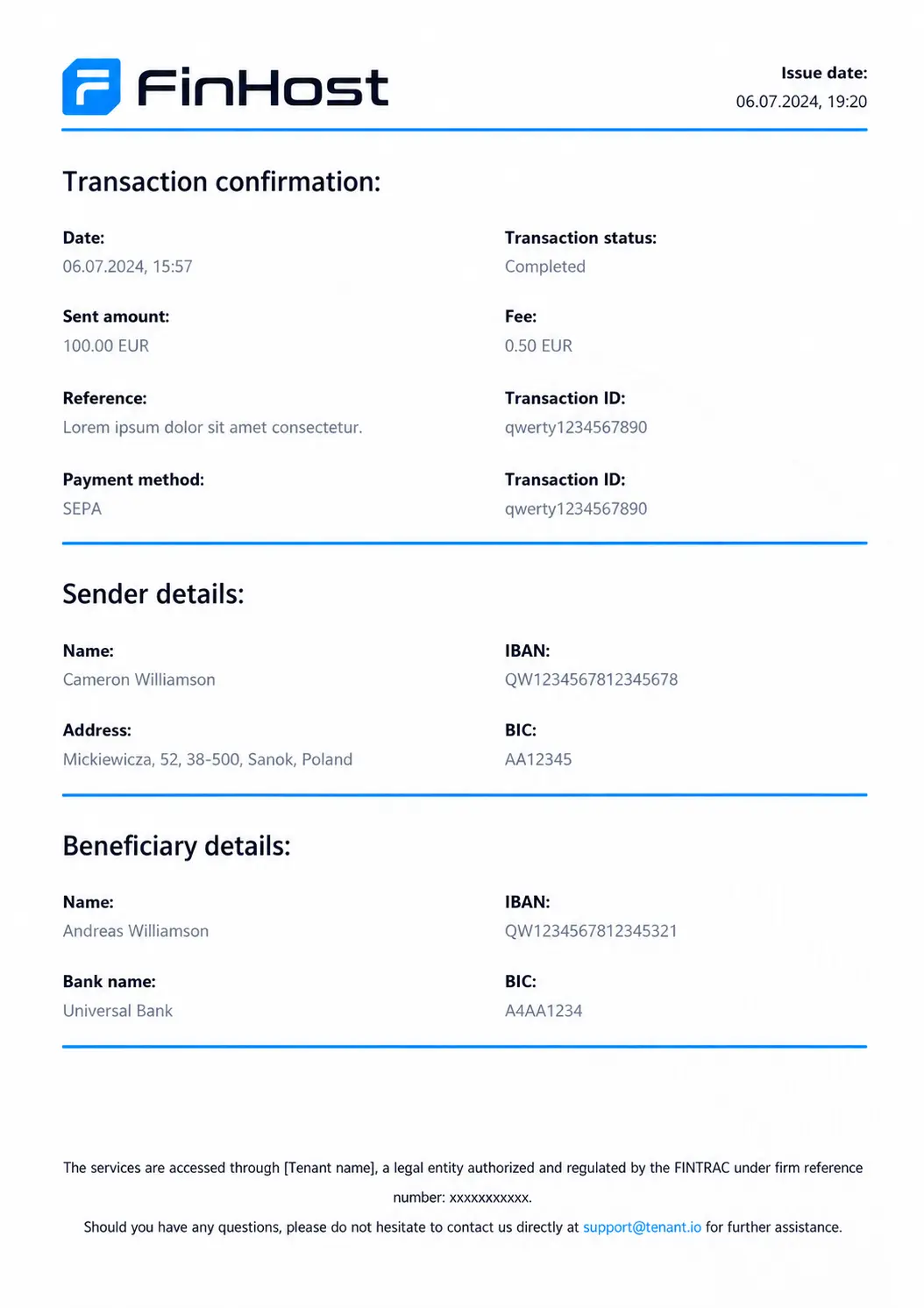
A formal PDF generated from the completed transaction
The PDF turns the in-app transaction record into a customer-ready document that can be saved, shared, or used as payment confirmation.
- Automatically generated from the recorded transaction data
- Issue date, transaction status, amount, fee, reference, and transaction ID
- Sender, beneficiary, and applicable bank details
- Additional page for intermediary bank information when required
One clear record, however the transfer was sent
Without a built-in receipt
- Chasing down a bank statement for proof of payment
- Generic confirmations that don’t reflect the recipient’s real bank details
- No easy way to send the same payment again
- A different format for every payment method
With FinHost
- A downloadable PDF generated from every supported outgoing transfer
- Full sender and recipient bank details, matched to the corridor
- Send Money Again built directly into every receipt
- Complete multi-page output when a SWIFT payment includes an intermediary bank
From a completed transfer to a record you can keep
Complete a transfer
Any outgoing fiat payment.
Open the transaction
Find it in the account’s history.
View the details
Confirmation, sender, and recipient.
Check the full record
Bank details for the corridor used.
Generate the receipt
Select Get a Receipt and download the PDF.
Everything needed in the generated PDF
Date and time, status, amount, transaction ID, reference, and payment method, on every receipt.
IBAN, BIC, sort code, or bank routing details, shown when they apply to the payment method used.
A customer-ready document generated on demand from an outgoing fiat transfer.
Digital Transfer Receipts
What information is included on a transfer receipt?
Date and time, status, amount, transaction ID, reference, and payment method, along with full sender and recipient details.
Do receipts show the recipient’s bank details?
Yes, matched to the payment method used: IBAN and BIC for SEPA and SWIFT, sort code and account number for UK Faster Payments, and equivalent details for other corridors.
Are receipts available for every type of transfer?
Receipts are generated for outgoing fiat transfers.
What happens if the payment includes a fee?
The amount updates to show “Amount with fee,” with the base amount and the fee both shown separately.
Can I download my receipt?
Yes. Open the completed transaction, select Get a Receipt, and FinHost generates a PDF that the customer can download and keep.
Can a SWIFT receipt include intermediary bank details?
Yes. When an intermediary bank is part of the payment route, its name, address, country, account number, and BIC/SWIFT can be included on an additional PDF page.
Can I send the same payment again from a receipt?
Yes, every receipt includes a Send Money Again option to repeat the same payment to the same recipient.